Description of Problem
Strict tracking prevention is a tool used to secure web browsing, however, occasionally this also prevents some websites from functioning properly.
If you need to turn this off on a trusted website, you can follow the below.
TABLE OF CONTENTS
Disabling Strict Tracking Prevention
In the example below, I'll just be using google.com.
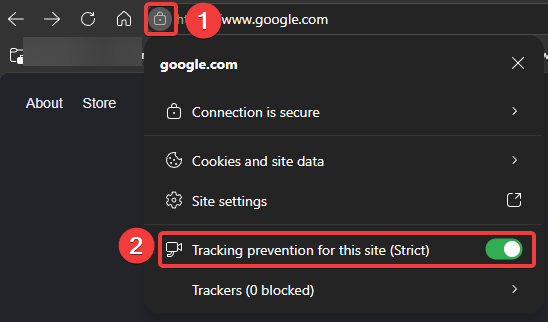
Head to the site that you want to disable strict tracking prevention for, then simply follow the screenshot below.
You'll see a padlock next to the URL in the address bar, click this and you'll see the option appear. The green slider means that it's currently toggled on, feel free to turn this off.
Once off, simply refresh the page and whatever issue you were facing will hopefully now be fixed. If not, feel free to reach out to our helpdesk and we'll be happy to take a look.
Was this article helpful?
That’s Great!
Thank you for your feedback
Sorry! We couldn't be helpful
Thank you for your feedback
Feedback sent
We appreciate your effort and will try to fix the article