Bitwarden supports both personal and organisational use. By default, items saved outside of an organisation are stored in My Vault and remain under personal ownership — meaning they aren't subject to organisational controls or visibility.
Bitwarden has introduced a feature for business subscriptions that allows organisations to take ownership of vault items, enabling centralised management, access control, and oversight across all users.
This guide walks you through the one-time migration of your personal vault items into organisational ownership.
TABLE OF CONTENTS
Centralize Organization Ownership
What is it?
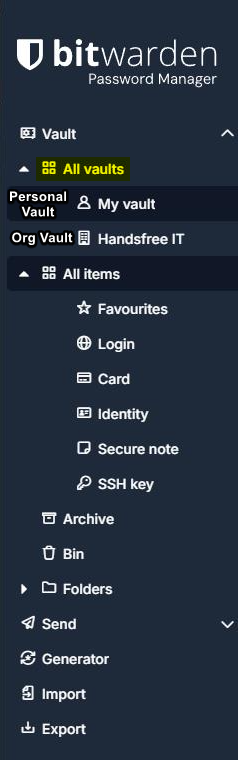
Centralise Organization Ownership is a feature within Bitwarden that transfers the ownership of items stored within the "My Vault" Personal Vault in Bitwarden from the user to the organization they're a part of. See the current layout for Bitwarden without Centralize Organization Ownership, with "My Vault" being in it's own section, separate from the Organization's Vault:
The Feature Has Been Enabled - How do I transfer my items?
If your company has opted to use this feature Handsfree IT will enable the centralise org ownership feature at an agreed date and time.
The transfer items prompt will only appear in the web browser version of bitwarden and not in the desktop or mobile app.When the setting is enabled, you will need to navigate to the following link in a web browser and sign-in: Bitwarden Web vault
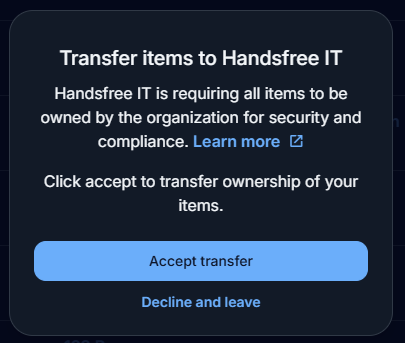
Once signed in, you'll be greeted with this pop-up, of which you'll need to select "Accept Transfer":
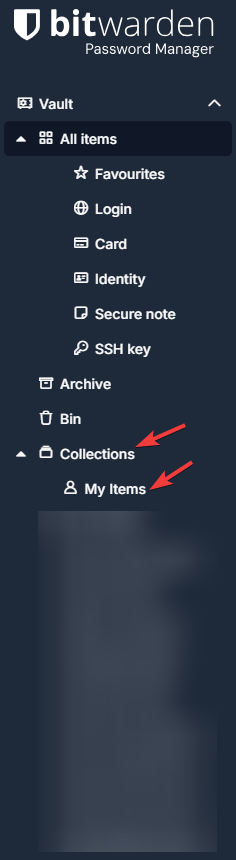
Once accepted, your Personal Vault will now have been migrated into the organization. Your Personal Vault items and folder structures will be found under "Collections > My Items":
Was this article helpful?
That’s Great!
Thank you for your feedback
Sorry! We couldn't be helpful
Thank you for your feedback
Feedback sent
We appreciate your effort and will try to fix the article